
We offer two ways to help you understand the solution to this query. Pick whichever works best for you:
Prefer to watch?
Start with our short walkthrough video that shows you exactly how it works, step by step.
Prefer to read?
Scroll down for the full written guide with screenshots and detailed explanations.
At the USPTO, every utility patent application is assigned a set of CPC (Cooperative Patent Classification) codes. These are precise labels describing what your invention does and where it fits within the global classification system.
The USPTO moved to CPC on January 1, 2013, replacing its older USPC system. So CPC is the framework your application will actually be classified under.
This assignment directly impacts:
- Which prior art gets searched against your claims
- Your application’s allowance rate
- The cost and time to grant
Some CPC codes carry allowance rates below 10%, while others exceed 80%. An application drafted with the right CPC codes in mind can mean the difference between smooth prosecution and years of costly back-and-forth with the patent office.
New in the Predictor Tool: CPC Code Prediction
The Predictor Tool already tells you which art unit is likely to examine your application. It now predicts CPC codes too.
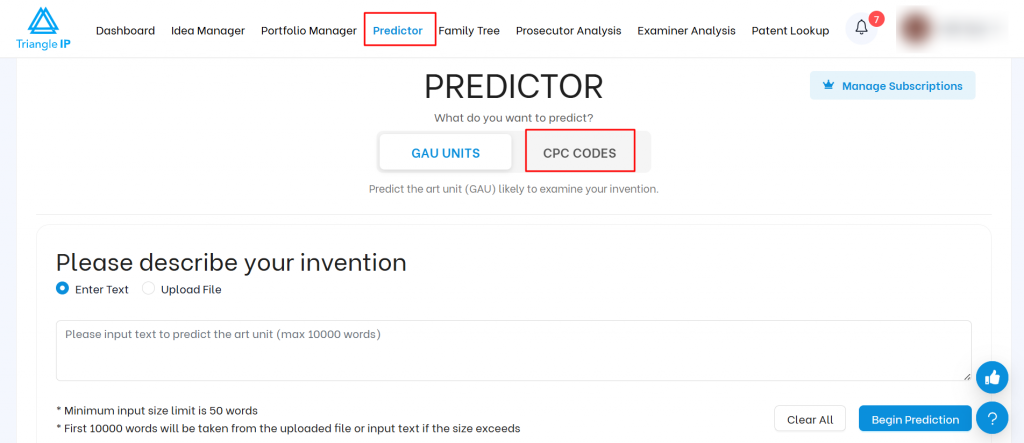
Open Predictor from the top navigation menu of the TIP Tool. You will see two tabs at the top of the page:
- GAU Units
- CPC Codes
The tool opens on GAU Units by default. Click the CPC Codes tab to run a CPC prediction.
New to the Predictor? Start with How to Predict the Art Unit Using the TIP Tool™ for a walkthrough to predict the Group Art Unit.
Step 1: Describe Your Invention
You can enter the details in two ways:
- Type your invention description directly into the text box
- Or upload a .txt file containing your draft, abstract, or claim set
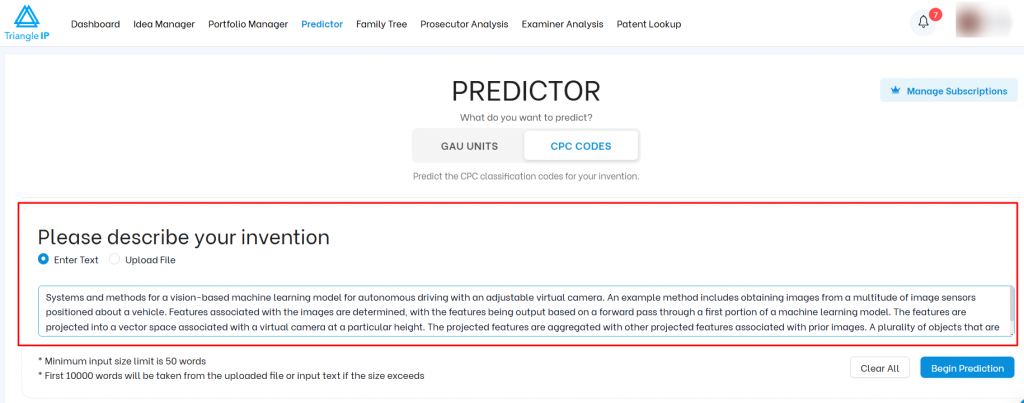
A few things to keep in mind before you begin:
- The minimum input is 50 words
- The tool accepts up to 10,000 words
- If your file exceeds 10,000 words, only the first 10,000 words will be used for the prediction.
Step 2: Click “Begin Prediction”
Once you enter or upload your text, click the “Begin Prediction” button. The tool processes your input using machine learning models trained on USPTO’s public prosecution data.
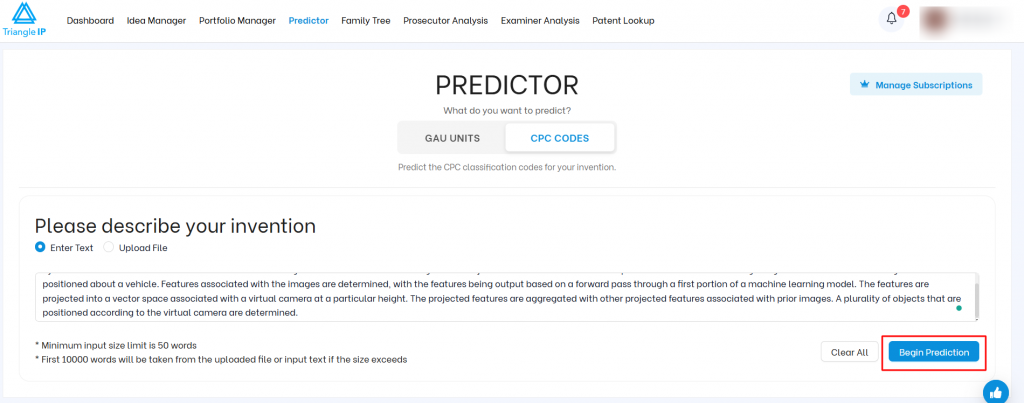
In just a few seconds, you’ll see the predicted CPC codes for your invention, along with the confidence scores and allowance rate for each CPC Code.
What The Predictor Tells You
1. Significant Terms & Related CPCs
You’ll first see a list of key terms identified in your submission with an indication of which CPC Codes they’re likely linked to.
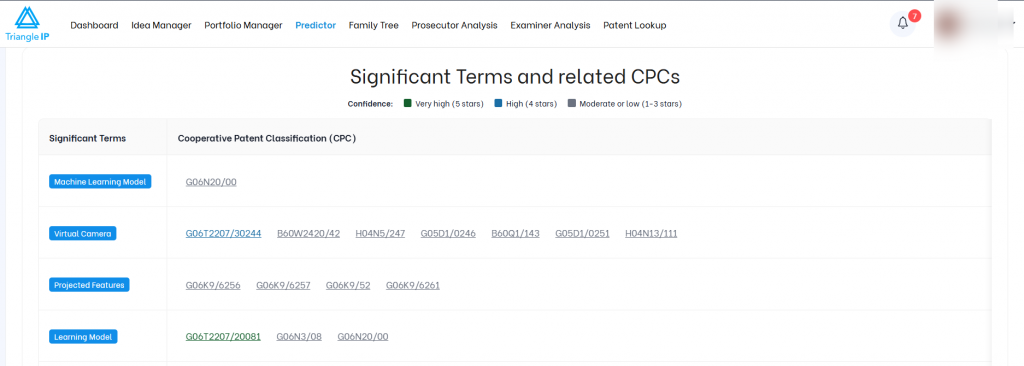
This list is extremely useful:
- You can identify unwanted terms that may steer your application toward difficult art units.
- You can add terms that are linked with preferred art units to influence application assignment.
2. Predicted CPC Codes
Next, the tool will display a ranked list of CPC codes organized by confidence level.
Each row shows:
- Confidence level – Shows how strongly the model links your text to that CPC code.
- CPC codes predicted at that confidence level
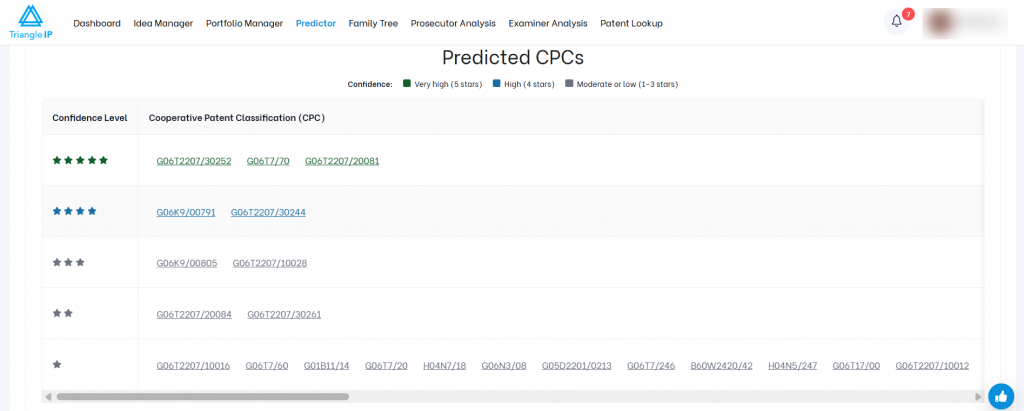
Use this to determine:
- Whether your application is likely to enter a difficult CPC.
- If changes are needed to steer toward a CPC code with better outcomes.
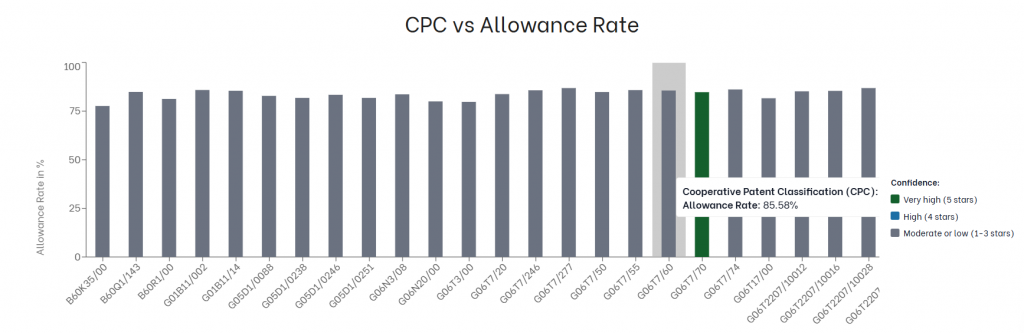
3. CPC vs. Allowance Rate Chart
Below the predicted codes, the tool gives you a bar chart that maps every predicted CPC code against its historical allowance rate.
Use this to make a business case to revise draft language to avoid high-rejection zones
Rerun, Refine, Repeat
What makes the TIP Tool™’s Art Unit Predictor powerful is its real-time feedback loop:
- Update your draft
- Rerun the prediction
- See how your changes shift predicted CPCs
Run the GAU prediction alongside the CPC code prediction for the fuller picture. GAU tells you the broader examination area your invention falls into, such as semiconductors. CPC narrows that down to the specific technology or solution.
Together, they show you where your invention sits and how it is likely to be examined.
This supports smarter drafting from the idea stage. You see how your language shifts classification before you file, rather than after.