
We offer two ways to understand how patent cost estimation works in the TIP ToolTM. Choose what suits you best:
Prefer to watch?
Use the walkthrough video to see how patent cost estimates appear as ideas move through the patent lifecycle.
Prefer to read?
Continue below for a step-by-step guide.
What is Patent Cost Estimation in the TIP Tool™?
Patent cost estimation provides an early estimate of patent-related costs so you can make informed decisions before and after filing.
Instead of waiting until office actions begin, the TIP Tool™ gives you patent cost visibility upfront, helping you evaluate:
- Whether an idea is worth filing
- How expensive a case may become over time
- How costs evolve as prosecution progresses
The patent cost estimates aren’t exactly down to the dollar. Instead, they’re designed to be accurate enough to guide planning and prioritization.
Where Does Estimated Patent Cost Appear?
Patent cost estimation is available at two key stages in the TIP Tool™:
- Before filing (in the Idea Manager)
- After filing (in the Portfolio Manager)
The sections below explain how to use both.
A. Estimating Costs in the Idea Manager (Before Filing)
Use the Idea Manager to estimate costs before committing to a patent filing.
Step 1: Go to the Idea Manager tab
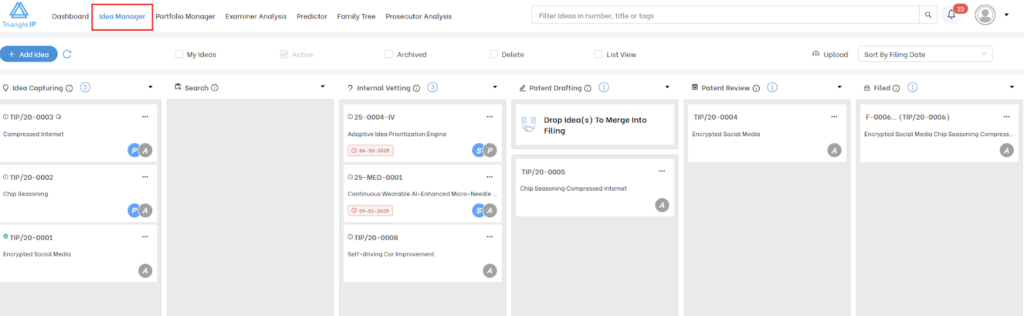
Step 2: Add and Publish an Idea
Click Add Idea, enter the title, inventor details, and invention summary, then publish the idea. Patent cost estimation begins automatically once an idea exists.
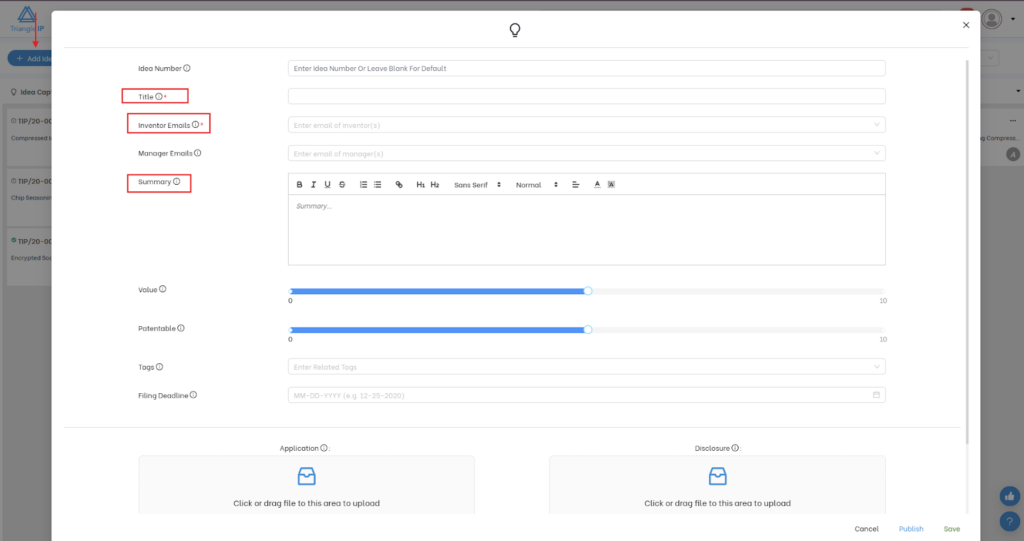
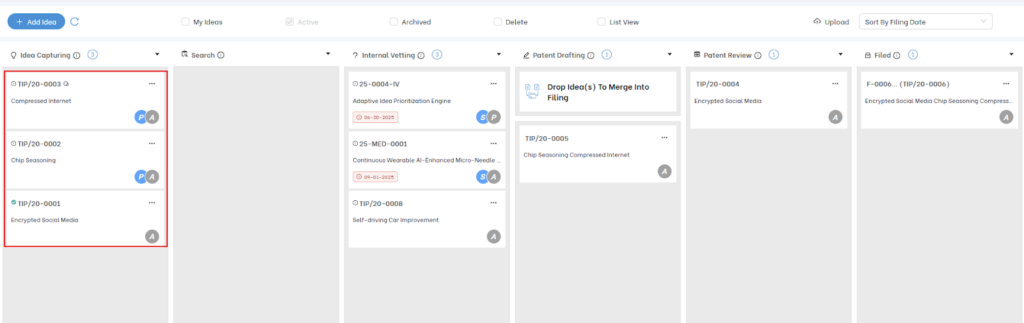
Step 3: Open the published idea
Step 3: You can see predicted statistics such as:
- Estimated cost
- Average argument rounds
- Average allowance rate
- Expected time to allowance
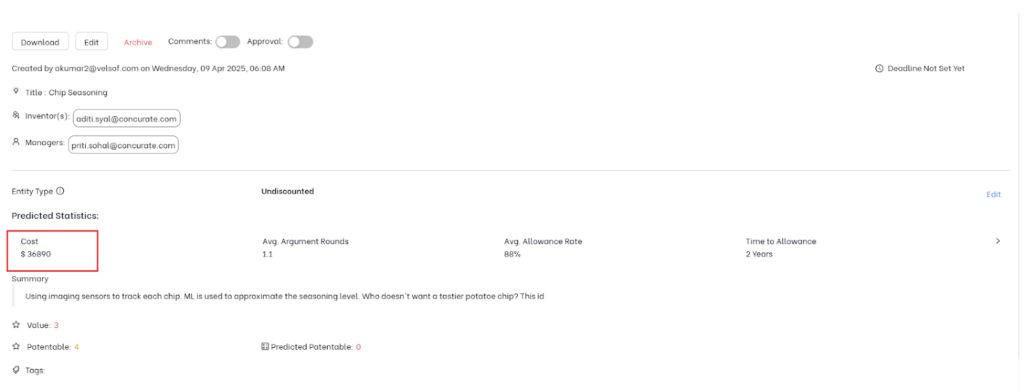
Tip: More detailed summaries lead to more accurate predictions, as the system uses this information to assess prosecution complexity.
Step 4: Within the idea view, you can also see a detailed breakdown for both provisional and non-provisional costs.
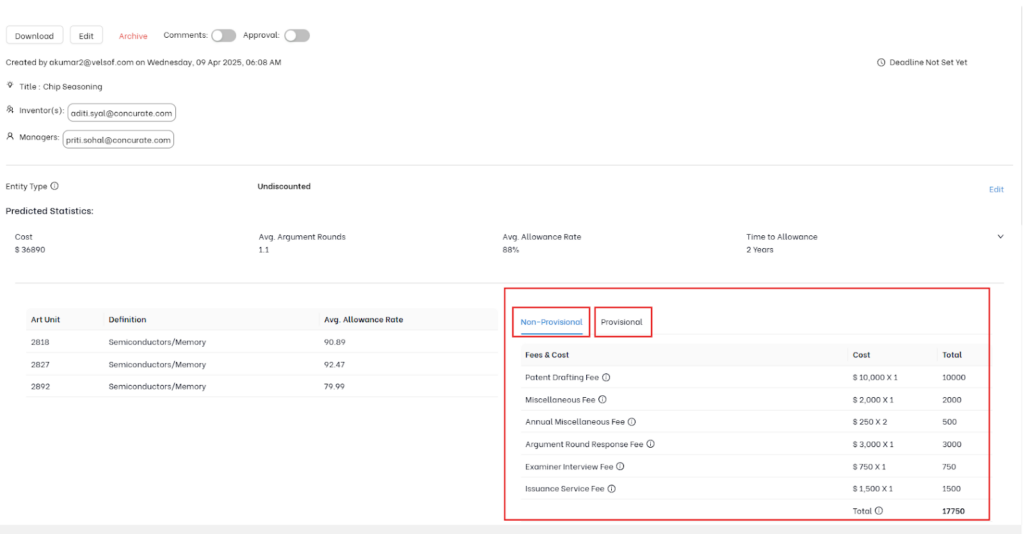
Note: Government fee components used in patent cost estimation are accurate and kept up to date with the latest USPTO fee standards. Whenever USPTO fee structures change, the TIP Tool™ automatically updates the applicable cost values, ensuring predictions remain current.
B. Estimating Costs in the Portfolio Manager (After Filing)
Once an idea becomes a filed U.S. patent application, cost prediction continues in the Portfolio Manager.
Step 1: Open the Portfolio Manager
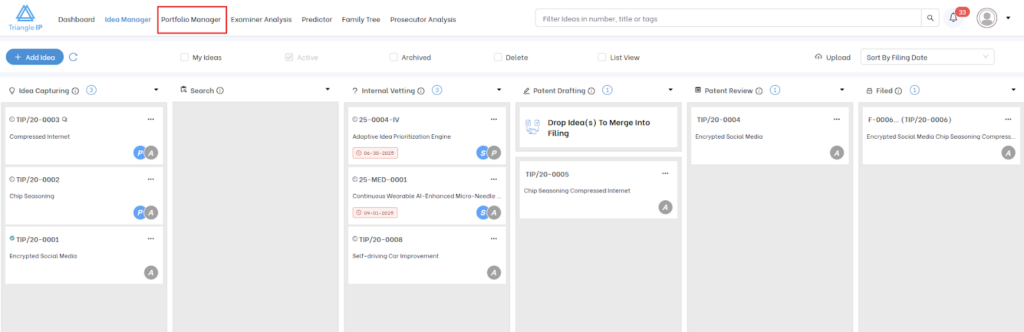
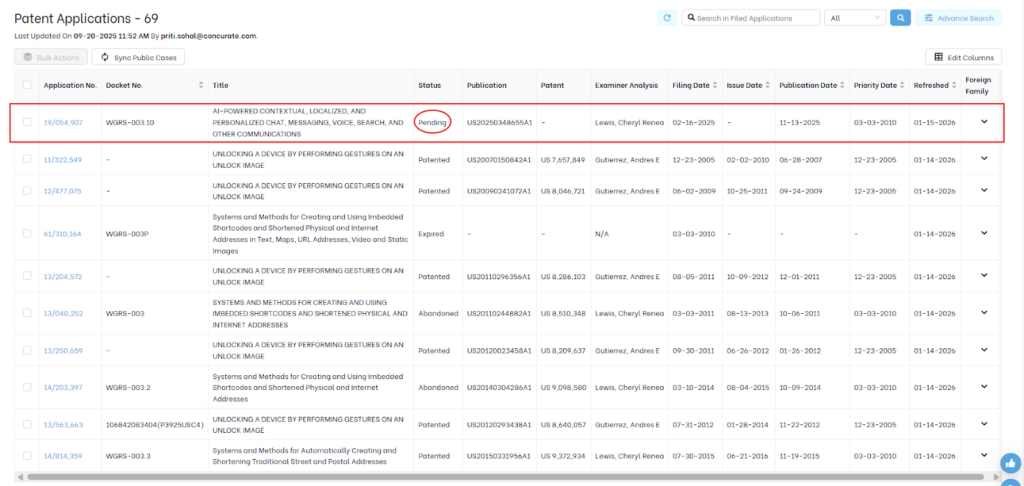
Step 2: Click on a pending U.S. patent application from the list.
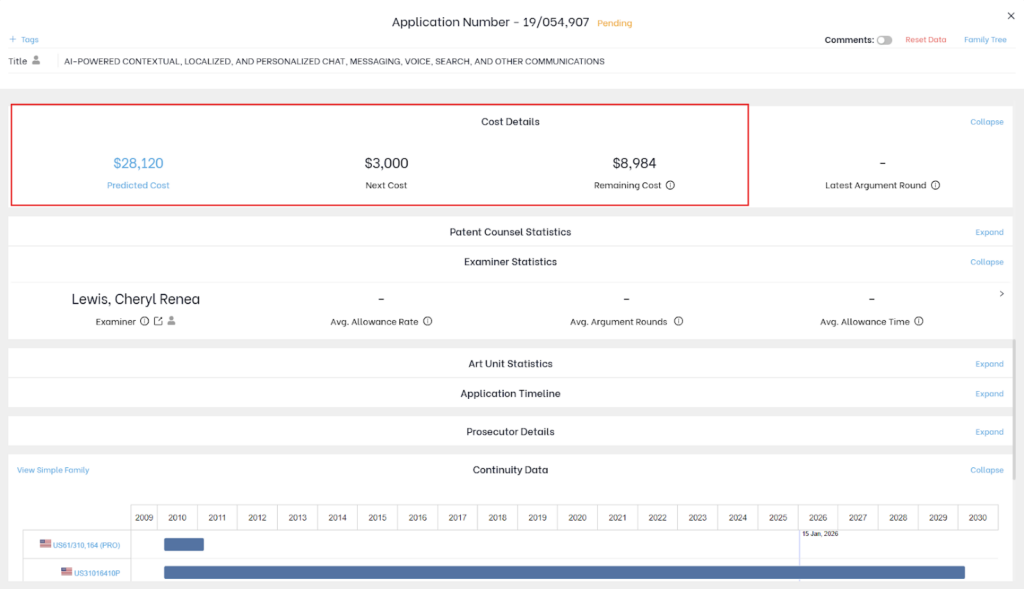
Step 3: Inside the case view, you’ll see:
- Total projected cost (from filing to issuance)
- Costs incurred so far
- Remaining estimated costs
As prosecution progresses:
- Patent cost estimations update automatically
- Remaining cost estimates adjust
- Accuracy improves as real prosecution data becomes available
Customizing Patent Cost Assumptions
Customizing cost details ensures that the estimates you see in the TIP Tool™ reflect how you actually work with your patent counsel, making them more realistic and useful for planning and decision-making.
For example, you may:
- Work on flat-fee arrangements instead of hourly billing
- Pay different rates for office action responses or interviews
- Have negotiated pricing with preferred law firms
- Qualify for USPTO fee discounts as a small or micro entity
Without customization, estimates may be directionally correct but not fully aligned with your real costs.
To reflect your actual counsel fees, you can update cost assumptions in the Admin Panel.
Note: Only the Portfolio Owner can edit cost-related details. Other Admins have view-only access.
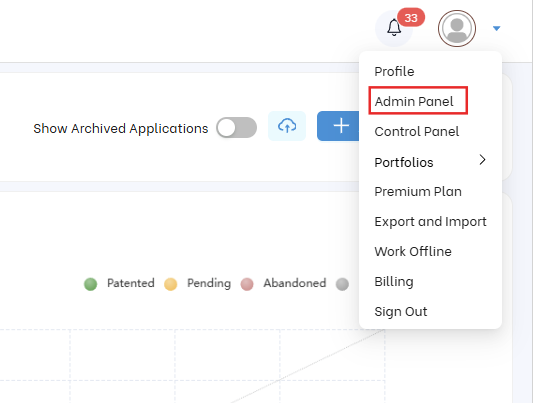
Step 1: Go to the Admin Panel from the drop-down menu in the top-right corner.
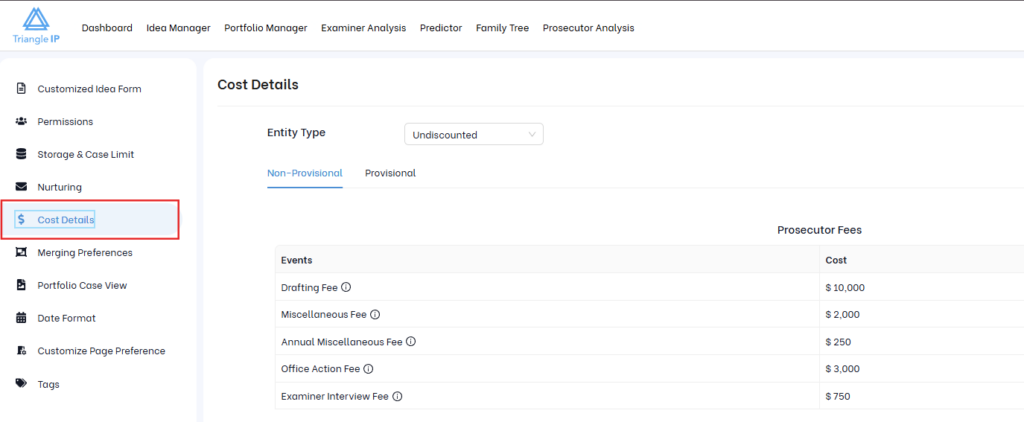
Step 2: Click on Cost Details
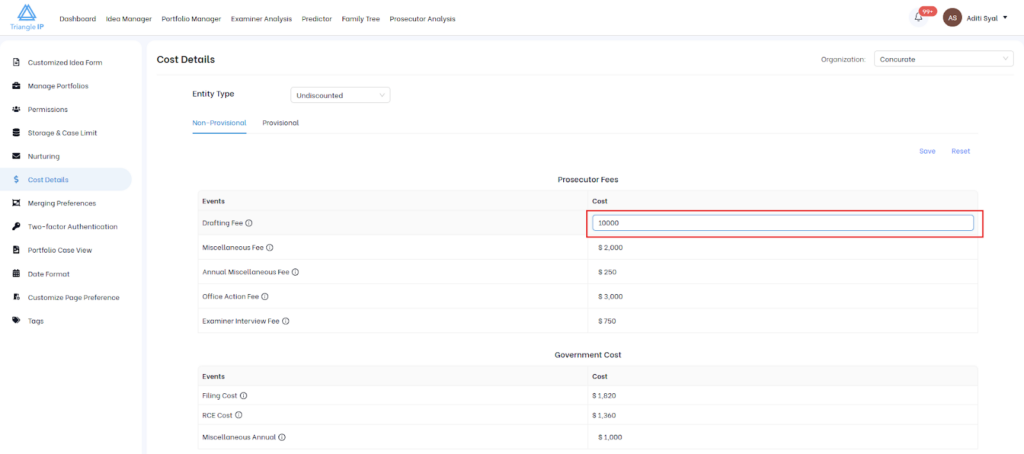
Step 3: Update Cost Values
You can modify values such as:
- Drafting fees
- Office action fees
- Interview and argument fees
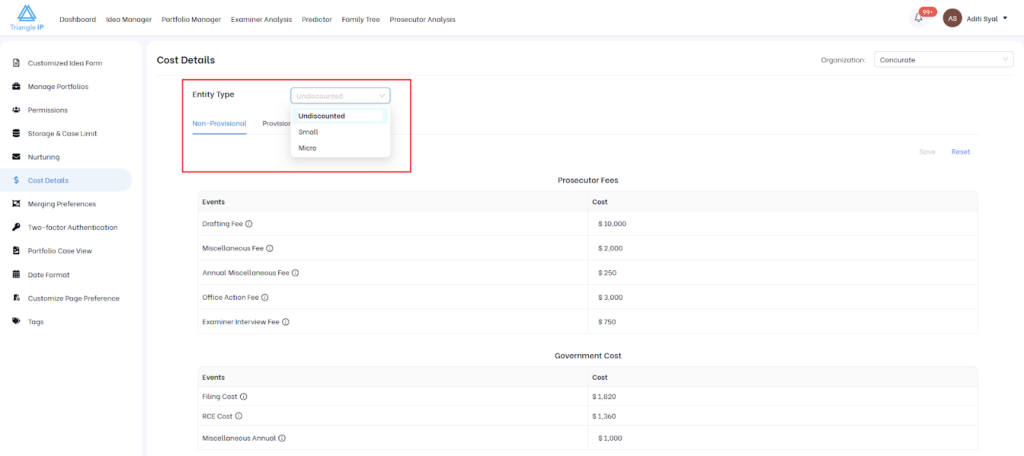
Step 4: You can also select your entity type (undiscounted, small or micro). Government fees update automatically based on this choice.
These settings apply automatically across all ideas and applications.
Why Patent Cost Estimation Matters
The TIP Tool™’s cost estimation feature gives you a clear, realistic view of patent costs at every stage of the lifecycle. It uses historical data, machine-learning insights, and customizable fee assumptions. Together, these give you the clarity you need to decide what to file, continue, or stop.
Common Use Cases
1. Early Go / No-Go Decisions
Before investing time and money into drafting and filing, teams can use early cost estimates to evaluate whether an idea is worth pursuing. By comparing predicted costs with business value and patentability, stakeholders can make informed decisions early in the process.
Benefit: Reduces spend on low-value, high-risk, or overly expensive ideas before costs escalate.
2. Budget Planning Across Portfolios
For organizations managing multiple ideas and filings, cost estimation helps forecast total IP spend across portfolios. Portfolio managers can see projected costs for each case and roll them up to estimate quarterly or annual budgets.
Benefit: Enables more accurate budgeting, better allocation of resources, and fewer unexpected cost overruns.
3. Identifying High-Cost Cases Early
Some cases are likely to involve longer prosecution, more office actions, or tougher examiners. Cost highlights these cases early, allowing teams to recognize where costs may increase over time.
Benefit: Supports proactive decisions such as narrowing claim scope, reallocating budget, or discontinuing cases that no longer justify the investment.
4. Aligning Estimates with Counsel Fees
Admins can customize cost assumptions to match negotiated flat fees, preferred billing models, or firm-specific charges. This ensures that predictions reflect how the organization actually pays for patent work.
Benefit: Keeps cost estimates realistic, consistent, and tailored to your organization’s agreements with counsel.
5. Ongoing Case Monitoring
As the prosecution progresses, teams can track costs incurred to date and view updated estimates for remaining expenses. This helps everyone stay aware of what’s coming next and how much it is likely to cost.
Benefit: Improves visibility into future spend and supports better planning for upcoming prosecution steps.